watchfaces.
a watch face for COROS, and a training screen.
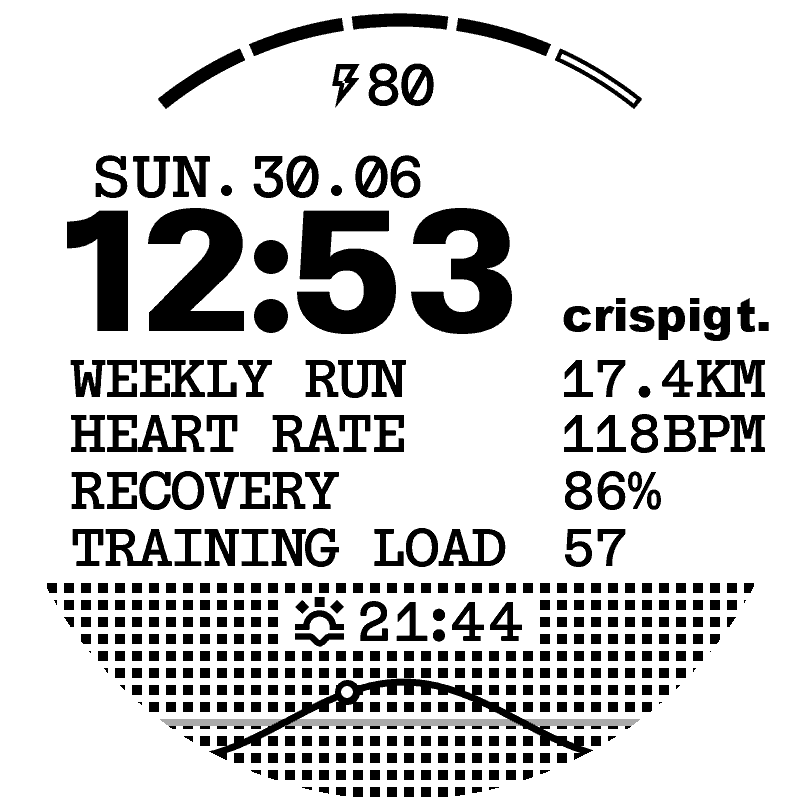
the satisfy face, on a pace 3.
This is a replica of the watch face Satisfy designed for the COROS APEX 4, not an original idea. I liked it, wanted it on my PACE 3, and rebuilt it. The look is theirs, the build is mine, and it now comes as a project for 13 COROS models.
- tested on
- PACE 3
- released
- models
- 13
Installation
with your own account in CorosLink
- Install CorosLink (opens in a new tab) on a Mac, Windows or Linux computer.
- Download the ZIP for your exact model below. Keep it compressed.
- In CorosLink, open Watch Faces, then Import, then Choose ZIP or DAT archive, and pick the ZIP.
- Choose Send to COROS, pick your account's region and sign in on the computer. Keep the imported model and design.
- Publish, then open the COROS link it gives you on the phone paired with your watch. Save the face to your custom watch faces and sync.
The ZIP is a desktop project, not a phone installer. CorosLink is a third-party app, you sign in there and never on this site, and signing in may sign your phone app out. Pick your account's region, not where the watch was bought, CorosLink labels COROS's global server United States. Checked with CorosLink 0.1.33. Installation outside Europe is still being tested.
on your phone, while a link is live
- Choose your model and COROS account region below, then open its install link on the phone paired with your watch.
- Save the face to your custom watch faces in the COROS app.
- Select it there and sync it to the watch.
Choose the region of your COROS account, regardless of where you are or bought the watch. Each share link lapses after 48 hours and only appears while live. A link from another region may return error 9024. If your region has no link, use the ZIP path above. None is live right now, so use the ZIP path above.
Models
- PACE 2V1 · not yet tried on a watch
- download zip for PACE 2
- PACE 3V1 · tested on my watch
- download zip for PACE 3
- PACE ProV1 · dim always-on clock, not yet tried on a watch
- download zip for PACE Pro
- PACE 4V1 · dim always-on clock, not yet tried on a watch
- download zip for PACE 4
- APEX ProV1 · not yet tried on a watch
- download zip for APEX Pro
- APEX 2V1 · not yet tried on a watch
- download zip for APEX 2
- APEX 2 ProV1 · not yet tried on a watch
- download zip for APEX 2 Pro
- APEX 4 42mmV1 · not yet tried on a watch
- download zip for APEX 4 42mm
- APEX 4 46mmV1 · not yet tried on a watch
- download zip for APEX 4 46mm
- VERTIXV1 · not yet tried on a watch
- download zip for VERTIX
- VERTIX 2V1 · not yet tried on a watch
- download zip for VERTIX 2
- VERTIX 2SV1 · not yet tried on a watch
- download zip for VERTIX 2S
- NOMADV1 · reported working by a NOMAD owner
- download zip for NOMAD
Release notes
- Version V1
CorosLink projects for 13 models. Each ZIP selects its watch and keeps the artwork through import and export. PACE Pro and PACE 4 add a dim clock-only always-on display.
- Version V1
PACE 3. First release, everything working.
Each ZIP is a CorosLink project: a manifest that selects the watch, the face source, and a preview. Import it as is for editing or for the account path above.
file checksums
- PACE 2 · sha-256
50b1b5fcd29a36e16d9865deb0c39927c4a3bd58e6cc680b60e571d3bb60730a- PACE 3 · sha-256
266b0ea7b8b7bdcf4e09357c153e86ebb79456261ebe4e6c58f4e731dc676d5e- PACE Pro · sha-256
f351cb2caba4a55bd89a397067d09293dda65d1c50f770e20eb213befcea1625- PACE 4 · sha-256
14cda6e47c398e94469030c5565b324c1cb82ae712e73d17d4475d9555ec0b07- APEX Pro · sha-256
ecc8f264c7d4d39027cec30cac2c255a0a001bf168aa35537a93d66012a5db05- APEX 2 · sha-256
f3d1442a32ea1bd724905effcbd5e7c9d156c9a0e7ad8381f8e7c0efb0e53412- APEX 2 Pro · sha-256
868596989d169dc11c808d076f69de3fa76386913937289b4e5847321685b2bd- APEX 4 42mm · sha-256
c586fefc9b89c2f72a32177eedb09e492cc82d7745bdd16b8052eb787a52671a- APEX 4 46mm · sha-256
b1a8292e0d74be69ed4d6636ca2873aaa4cb7c6b7807979ca472780b899104a6- VERTIX · sha-256
cc69b3bb10583e89587d737133099e1e8fa8af8ae2cd1da85e0e1303f38101c5- VERTIX 2 · sha-256
23f3a0e5d2ca9eca2f0659c97bd405ab9f67d2b3746e8f29f8bc134d54279a2e- VERTIX 2S · sha-256
faa28f6be3172c2c84c9f2ec4919df6efd2ca6f463ee8435e2a29ef78c168600- NOMAD · sha-256
050c77134aac614bdb9ad9e4806868ce59855a160fa7dfd387c59e367677f360
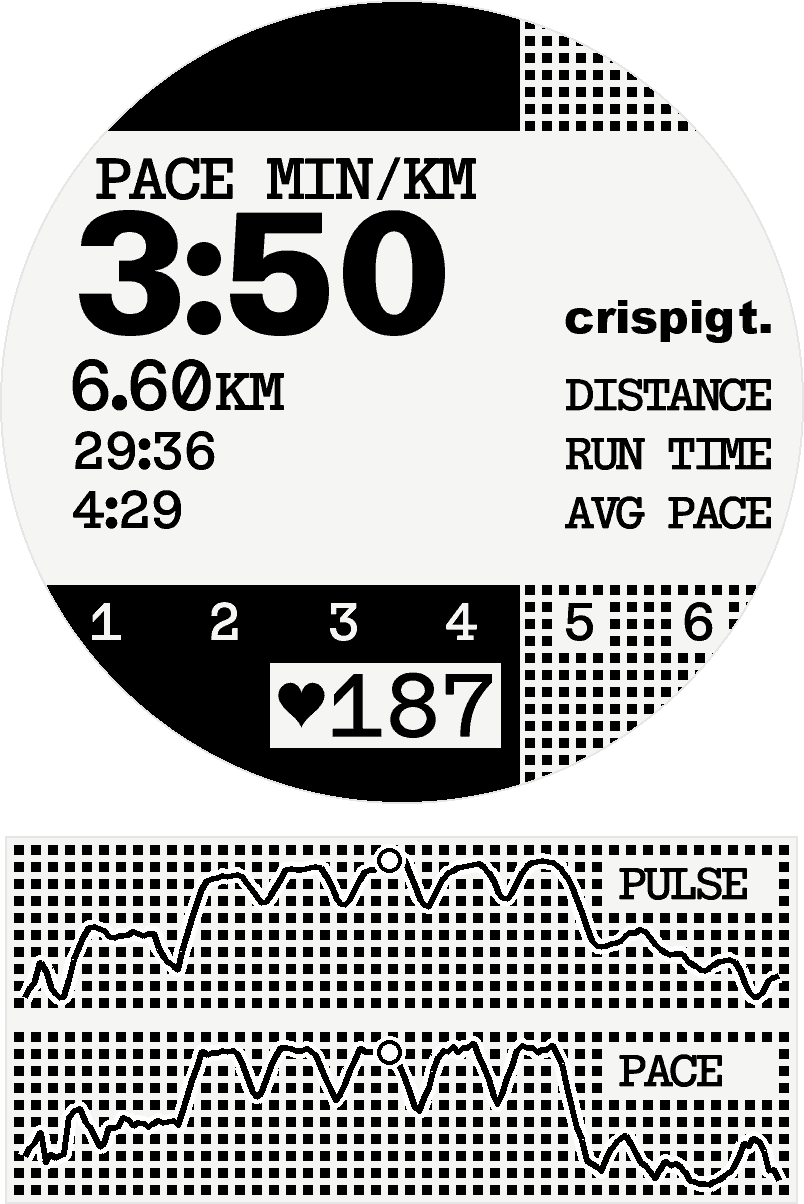
the training screen, on no watch yet.
My own screen for a run, on the face's sprites and grid. Pace sits where the clock was, with distance, run time and average pace under it. Heart rate gets a badge, and the zone fills the dot fields from the left as it climbs. The replay is one of my runs, intervals with the standing around cut out, and the graph under the disc is its pulse and pace.
- based on
- the face, and Satisfy's before it
- run
- , 12.9 km, Stockholm
- revised
Installation
none, for now
A COROS run screen is a firmware layout, the app picks a metric per slot and the watch draws it in its own fonts. Nothing on that path takes sprites, so the face compiler has no way into a run. I just want my own screen on my own watch, how hard a jailbreak of the PACE 3 would be I don't know yet.
Revisions
- Revision R1
Started the afternoon the face was signed off. What I look at on a run is HR, the zone, pace in min/km or what it is, and average pace for the whole thing, so those went in, same spacing and feeling as the face. The zone fills the grid from the left instead of a battery, which was kind of unnecessary anyway, with 1 to 6 written in so you know where you are, and HR sits with a little heart where the sun curve was. Distance and elapsed came the same evening once I noticed total distance is an important number too, then values moved left and labels right, and the zone numbers went inside the grid so they stopped looking like they were flying.